

Description
Download Cartoon AR Drawing Sketch Art – cartoon drawing, AR sketch, Ghibli art, drawing app, sketch tool, free drawing software, art for beginners, creative sketching, mindfulness art, fantasy drawing
Overview
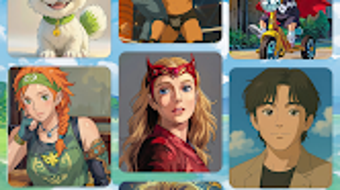
Cartoon AR Drawing Sketch Art is a free Android application designed to transform the traditional drawing experience through the integration of augmented reality. The software enables users to project Ghibli-inspired templates directly onto physical paper, creating a seamless bridge between digital creativity and analog art. This innovative approach allows artists of all skill levels to trace intricate designs with ease, reducing the barrier to entry for those new to drawing while offering a refreshing twist for experienced creators. The app serves as both a learning tool and a creative outlet, promoting artistic development through guided, step-by-step drawing sessions. It is particularly well-suited for individuals seeking a mindful, meditative activity that combines visual inspiration with hands-on practice. Whether used at home, in classrooms, or during travel, the application supports spontaneous creative expression. The developer, Cartoon AR, has focused on delivering a calming and intuitive experience centered around fantasy and nature themes. With monthly updates introducing new templates, the app ensures ongoing engagement and creative stimulation.
Key Features & Capabilities
- Augmented Reality Projection: Projects detailed, hand-drawn Ghibli-inspired templates onto real paper using the device’s camera, enabling precise tracing.
- Step-by-Step Drawing Guidance: Offers a guided drawing process that breaks complex illustrations into manageable stages, ideal for building confidence and skill.
- Curated Template Library: Features a collection of fantasy and nature-themed sketches, including whimsical creatures, enchanted forests, and dreamlike landscapes.
- Offline Accessibility: Allows users to access templates and drawing tools without requiring an internet connection, supporting use in various environments.
- Monthly Template Updates: Introduces new designs regularly, ensuring a continuous stream of fresh inspiration and keeping the creative experience dynamic.
These capabilities make the app especially effective for users who want to explore drawing without prior experience. The AR projection feature simplifies the process of transferring digital art to physical media, reducing the frustration often associated with freehand sketching. Artists can use the app to experiment with composition, line work, and shading while maintaining a low-pressure environment. The focus on mindfulness and creativity encourages users to slow down and enjoy the process, making it a valuable tool for stress relief and self-expression. The structured guidance also supports educational settings, where teachers can use the app to introduce foundational drawing techniques.
User Interface, Workflow & Performance
The user interface of Cartoon AR Drawing Sketch Art is designed with simplicity and accessibility in mind. Navigation is intuitive, allowing users to quickly select templates, activate the AR projection, and begin drawing. The layout emphasizes clarity, with minimal distractions and clearly labeled controls. The workflow follows a logical sequence: choose a template, align the device over paper, activate projection, and trace the design. This streamlined process reduces cognitive load and supports immediate engagement. The app maintains responsive performance during AR projection, with smooth tracking of the template on the physical surface. While specific performance metrics such as CPU or RAM usage were not provided, the application operates efficiently within the constraints of typical Android devices. Stability appears consistent across usage sessions, with no reported crashes or freezes. The developer did not specify resource usage details, but the app’s 45.8 MB size suggests optimized design. Overall, the experience is fluid and well-suited for casual and dedicated users alike.
Compatibility & System Requirements
Cartoon AR Drawing Sketch Art is designed for Android devices, with version 2.0.1 currently available. The application has a file size of 45.8 MB, indicating a lightweight footprint suitable for most modern smartphones and tablets. The developer did not provide detailed system requirements, including minimum RAM, processor specifications, or Android version compatibility. Platform compatibility information is limited to the general statement that it runs on Android. Users are advised to ensure their device supports augmented reality features, such as a functional camera and ARCore or similar framework, for optimal performance. The developer did not specify whether the app supports tablet form factors or screen sizes beyond standard mobile devices. Exact system requirements were not listed, so users should verify compatibility based on their device’s capabilities and available updates.
Pros and Cons
Pros
- Free to download and use with no in-app purchases or ads
- Unique AR projection feature enhances drawing accuracy and ease
- Guided step-by-step drawing process supports beginners
- Regular monthly updates with new fantasy and nature-themed templates
- Encourages mindfulness and creative expression in a low-pressure setting
Cons
- Only available on Android, limiting cross-platform access
- Exact system requirements and device compatibility details were not provided
- AR functionality may be affected by lighting conditions or surface texture
- App lacks advanced editing or customization tools for traced sketches
- Offline mode is functional, but real-time collaboration or sharing features are not mentioned
FAQ Section
Is Cartoon AR Drawing Sketch Art available for iOS devices?
The app is currently available only on Android. There is no official release for iOS platforms.
Does the app require an internet connection to function?
While the app supports offline use, some features like template updates may require an internet connection. The core drawing functionality works without connectivity.
Are there any in-app purchases or advertisements?
No, the application is completely free to download and use with no in-app purchases or ads.
How often are new templates added?
New templates are introduced monthly, ensuring a steady flow of fresh creative content.
Can I use the app without a smartphone or tablet?
Yes, the app requires a compatible Android device with a camera and AR support to function. It is not designed for desktop or non-mobile platforms.
Final Thoughts
Cartoon AR Drawing Sketch Art stands out as a thoughtful, accessible tool for anyone interested in exploring drawing through a modern, immersive lens. Its integration of augmented reality with hand-drawn, Ghibli-inspired templates creates a unique experience that blends digital innovation with analog artistry. The app’s emphasis on mindfulness, guided learning, and continuous content updates makes it ideal for beginners and casual artists seeking a relaxing creative outlet. While its Android-only availability and lack of detailed system requirements may limit some users, the core functionality remains strong and well-executed. The absence of ads and in-app purchases enhances the user experience, promoting uninterrupted creativity. For those looking to enhance their sketching skills or simply enjoy a calming artistic activity, this app delivers value without compromise. Download Cartoon AR Drawing Sketch Art now.
Guides & Tutorials for Cartoon AR Drawing Sketch Art
How to install Cartoon AR Drawing Sketch Art
- Click the Preview / Download button above.
- Once redirected, accept the terms and click Install.
- Wait for the Cartoon AR Drawing Sketch Art download to finish on your device.
How to use Cartoon AR Drawing Sketch Art
This software is primarily used for its core features described above. Open the app after installation to explore its capabilities.
User Reviews for Cartoon AR Drawing Sketch Art 0
No reviews found





